Because I was a bit short on time, I decided to let Codex (ChatGPT) build a website for my game MAZEdrift with Sitely 7.
I had to step in from time to time and make a few corrections, but most of the work was done automatically, which meant I could focus on other things in the meantime.
If anyone is interested, here is the finished website: www.mazedrift.com
Creating the German version took about one hour. Translating the whole website into 17 additional languages took around another 30 minutes.
Of course, this way of working is still far from perfect, and many of the great tools and features in Sitely 7 were barely used, if at all. But I think it already shows that this can be a pretty interesting way to work.
I also asked Codex to create a prompt based on everything it learned while working with Sitely. The idea is that on my next project, it should already understand Sitely much better and be able to handle the design and workflow more efficiently from the start.
The language-version speed is what catches my attention, though I’d be uneasy about quality on 17 translations without a native check on each one. I run a small handyman business site, so I’m weighing whether to try a similar AI-assisted build in Sitely or stick with the slow manual route I know. I also came across Hostinger AI Builder/Horizons Review (2026): Pricing, Pros & Cons while comparing options, and it made me wonder how much editing these generated layouts really need. Curious whether anyone here has tried the saved-prompt approach on a second project.
Thanks for your comment. Yes, you’re right about the translations. Of course I can’t guarantee that all 17 languages are perfect. But I think AI has become pretty good at this, and for my project the results are really impressive.
I’ve been using Sitely for many years now and I’m still very happy with it. Together with AI, there are so many new possibilities, and I like that I still have control over everything.
But you mentioned that you have a small handyman business website. That sounds interesting. Are you already using Sitely for it, or are you thinking about switching to Sitely?
And what exactly would you like AI to do for your website? Is it more about the design, creating content, or maybe translations too?
I’m just curious because you mentioned the manual way you already know. What are you using at the moment?
Would be nice to hear a little more about your own project and experiences.
I view the role of AI somewhat differently. Its a great tool but left to it’s own devices, it can produce rather generic-looking websites that look more like an application dashboard than a website, and I think that is really down to how people use these AI apps.
I have a number of clients who have happily displayed their Sitely-built websites for many years. However, as AI has evolved there is a growing trend for clients wanting their websites to be converted into web applications. What I’ve discovered is that Sitely has become the perfect partner for creating such apps. Instead of leaving the AI to build a web app from a simple prompt, I use Sitely to create the AI blueprint - this gives it something to work with in terms of design and layout, rather than relying on AI’s interpretation of what it thinks is needed.
The conversion process is relatively straight forward - even using free accounts on ChatGPT and your choice of app builder. (My own personal preference is Base44.). The process begins with a fully functional Sitely website - it doesn’t even have to have device variants - it can be created as a desktop only site. The important thing is that it should be fully functioning, complete with navigation, images and other media, and any animations you want included.
After client approval, the website is published to a local disk folder. All the files and folders in that publish location should then be zipped into a single file. The first step is to upload the zip file to ChatGPT and ask it to analyse the website with a view to converting it into an app by creating a suitable, and comprehensive prompt for use on your development platform. You should also advise ChatGPT if your development platform has any restriction on upload file sizes. (Many app builders limit individual file uploads to about 25MB). ChatGPT will decompress the zip, analyse the content and recommend a build sequence, as well as providing the prompt for you to send up to your development platform. It will even offer to split your zip file into more manageable chunks, ready for adding to the prompt as a set of individual files.
Over in your development platform, start a new build instruction and paste the prompt that ChatGPT created for you. Add the zip uploads then send the whole thing on its way. You will have to wait several minutes for the app builder to work its magic, but when its finished, you should see a fairly faithful reproduction of your original website, complete with animation effects, working navigation and, more importantly, all the device variants automatically created for you. If the app builder generates a few glitches, don’t worry - just go back to ChatGPT, with screenshots of any problems you may notice, and it will come back with additional prompts to fix the issues. Just upload these fix prompts in your development platform.
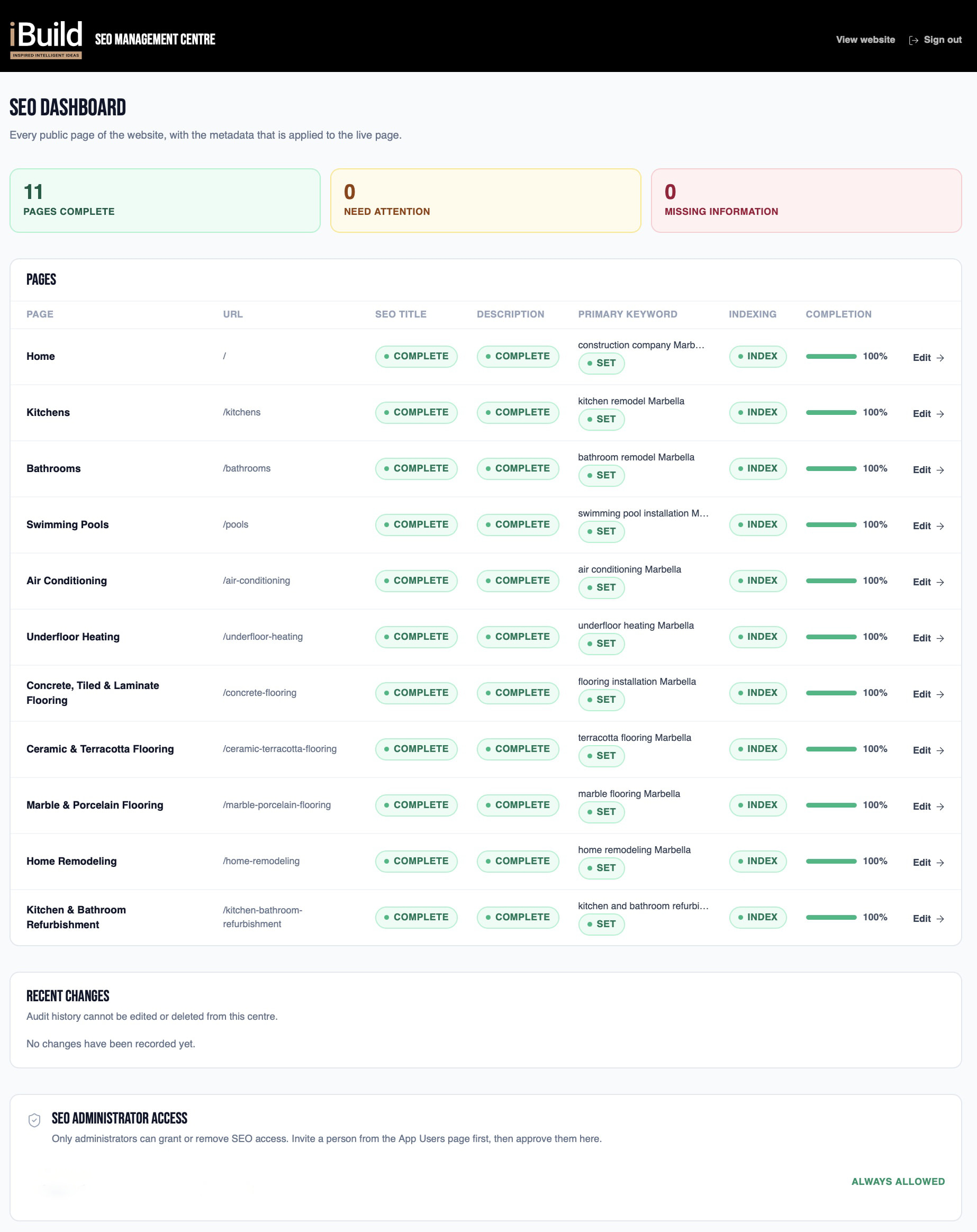
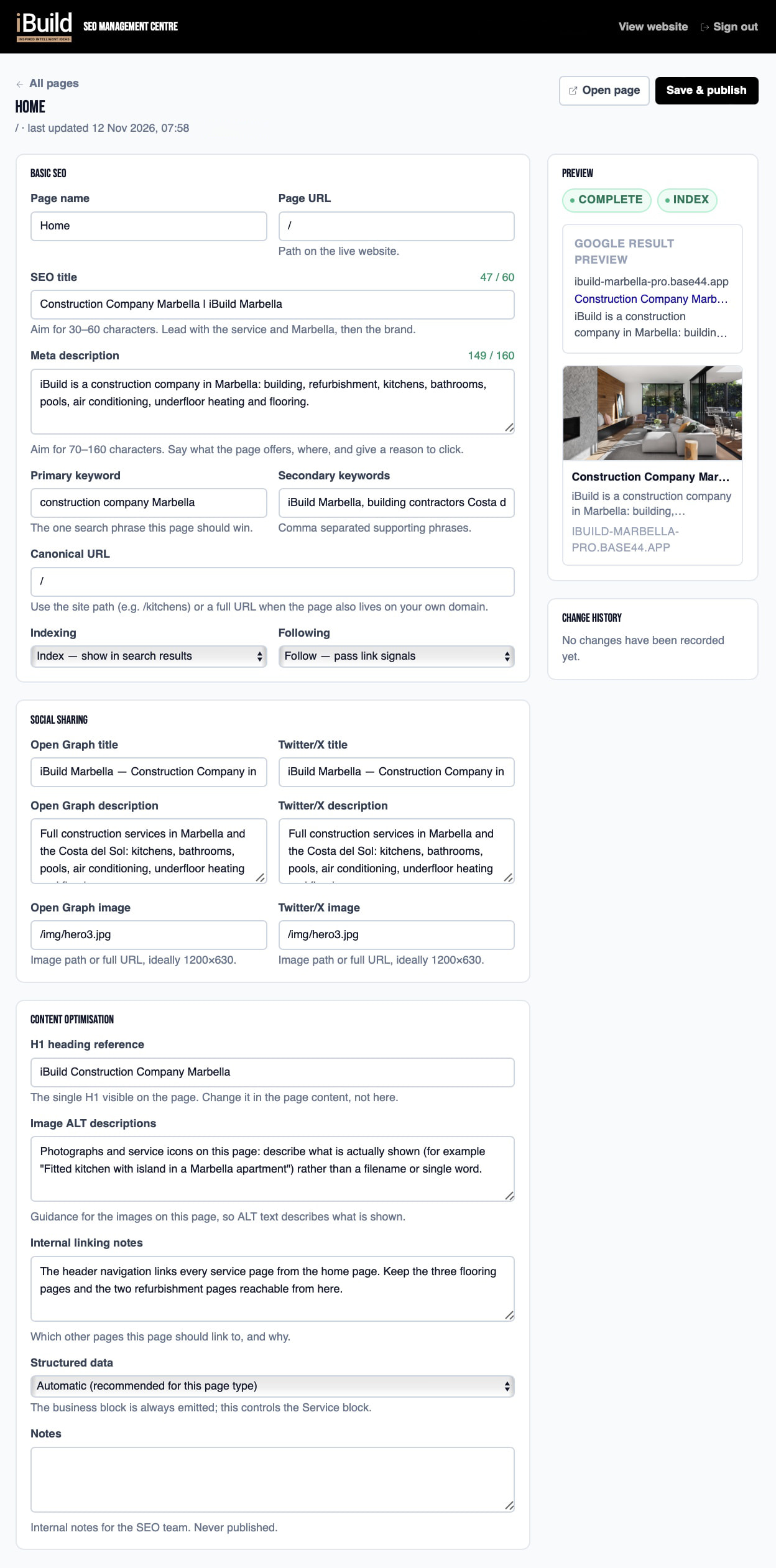
Once the app is working as you want it, you can start to think about other features you may like to add to the app that wouldn’t be possible in Sitely alone. For example, On many of my converted sites, I add in a User-Role login that allows the site owner or any other authorised person, to enter into an administrator area of the app right from the site front-end. One example of how this can be used is to have an SEO management system built into the app.This is like a separate module that sits behind the front-facing pages - so it doesn’t have to be designed outside of the app. This sort of functionality is great for setting up the SEO for all the pages in your site. You simply login as an administrator and you will be taken to an SEO dashboard that details all your site pages and gives a quick indication of whether those pages are SEO ready. Initially, the set data can be automatically completed by AI right within the app itself based on the content of each page. You can even manually edit the SEO data for each page if you want greater control. Below is an example of an SEO dashboard and an example of the settings for a specific page.
Of course, you could also add other useful features. In this example, I also added a quote generator and a invoicing module. Neither of these features interfere with the basic web-app - they are totally independent features that the public never sees.
So, the bottom line is Sitely is a still my go-to design tool for building websites, but using AI tools to deploy the site opens up a whole new world of opportunities. Give it a try, and don’t give up using Sitely just because AI appears to be taking over this space - good web sites still need creative vision and a human touch to make them work for human beings. Sitely is still your design tool, AI app builders are simply another publishing option.
If you want to take a peek at the development site, check the link below - just remember, this site was originally created in Sitely and is still online as a sitely website: