Best practices for large web site organization

Hi everyone. I’m a new Sitely user, and loving it. I’m currently on the trial period, but almost certainly will be upgrading to Pro within the next couple of days.

I have a question for what might be considered “best practices” when using Sitely. I have a large-ish web site originally developed using Muse that contains around 120 web pages that I’m working on re-designing in Sitely. And I’m trying to come up with the best way to keep my pages organized.

A relevant factor is that there are really two main consistent designs that need to stay in common throughout the web site. Some pages have a fixed header and footer that doesn’t move as the user scrolls, and some pages have the same header and footer but they scroll with the page. In Muse, I did this with two different templates applied to pages as required. In Sitely, I can accomplish the idea of a “template” with “Show this element on” all pages, or pages in page group. From my understanding, an item’s scroll behaviour carries over to all pages it is shown on, so I can’t have different scroll behaviour on different pages unless I have two different page groups with a “copy/pasted” header and footer in each page group with different scroll behaviour set to appear on each page within its page group. So far so good.

But then I can’t use page groups to organize pages within my site into anything other than those two groups. And though I can work with that if I have to, it would be much more convenient if I would be able to organize my pages into more page groups than just the two, and collapse the view of various groups on the left to make it more manageable.

So is there a way to organize pages somehow into more than two page groups, but still have just two main “styles” of elements appearing on multiple pages?

If not, would it be possible for a future version of Sitely to perhaps allow elements to be shown not just on the page group a page is on, but perhaps a list of page groups that could be chosen? That way I could have more page groups for organization, but be able to repeat a consistent layout on multiple page groups.

Or, an alternate way of viewing the pages on a site that could be organized in a way other than just a long vertical list of rather large “preview” images? I’m just trying to find a way where to work on a page, I don’t have to scroll through 50-75 pages on the left hand side to find it.

Or is there another (better) way I could accomplish this?

Thanks!

Dan

You’re not limited to just two page groups in Sitely - you can create as many as you need. Once your page groups are set up, you can choose whether elements appear across all pages or only within a specific group. This makes it easy to create and position elements - such as navigation - so they apply only to selected sections (for example, fixing a header to the top on certain groups of pages).

From a broader best-practice perspective, it’s worth being cautious about varying header behaviour between pages, especially when the header includes navigation. Inconsistent navigation can feel disorienting to users, so maintaining a consistent experience across the site is generally the better approach.

I can certainly create more than two page groups in Sitely. But if I do, many of those page groups will have the same elements appearing in them. If I’m understanding correctly, if I want to have consistent design elements the same within several different page groups, but not the entire web site, I think I would have to copy and paste those design elements to a page within each of the page groups separately, so I can then make them appear on all pages within the page group. That would work, except if I make any changes to those consistently appearing elements, I would have to change them in each of the page groups.

I agree it would be much easier if I could flag the consistent page elements to just appear in all pages within the site; then I could use the page groups for logical grouping for my use rather than for consistent layout. But the reason we have the header and footer remain fixed for some pages and not for others is limited screen real estate on smaller devices like iPhones. It’s good to have the header and footer always visible when the user is navigating through the structure of our web site so they can easily move around the site searching for the resource they are looking for. But eventually, when they find the resource, it can be several pages long; even more so on a small iPhone screen. And in that case, it’s nice to have the header and footer scroll out of the way, so they have more screen real estate to work with to view the resource they were looking for.

All valid points @syzygyrt, and welcome onboard! :slight_smile:

As @Stephie mentioned it is best practice to keep the navigations, and also in your case the footer consistent across all pages.

Totally understand regarding the limited real estate on the phones, but we can look at it in a different way… Have you thought on phone to have a “sticky hero navigation”, but not the fixed footer across all pages? When it comes to finding the resources (which you will have grouped) you could unstick the hero navigation for maximum real estate.

This will also create far less work for you…

1 Like

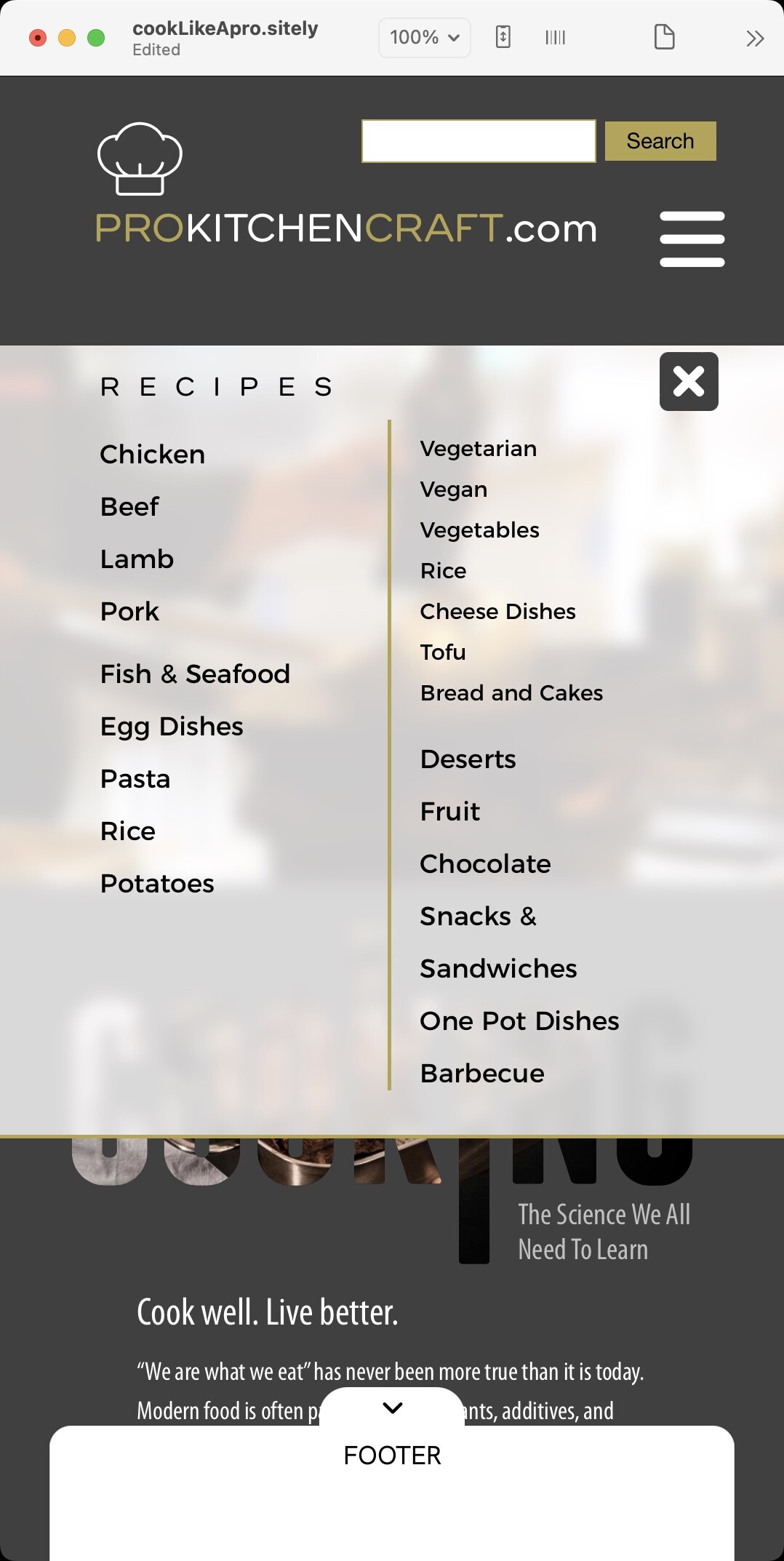
I would add that it’s often better to design navigation specifically for the device so that it becomes more intuitive for the user. For example, You could design the mobile page with a couple of pop-ups - one for the navigation and one for a footer area. These can be dismissed by the user to gain more screen real-estate, depending on needs. In the example below. the header area contains a hamburger link for the menu. Clicking the link reveals a minimal main menu. Clicking any of those links activates a pop-up containing a larger number of links to other pages.


Likewise, the footer area could also be a pop-up containing additional links and information. A link in the footer (the down arrow) can be tapped to dismiss the footer - freeing up the screen for the main page content.

This type of arrangement also works well across all devices, including desktop and tablet versions, so there is little need make different structures for each device - just make it standard across the whole site.

1 Like