I added a blog. But it didn’t automatically add to the main menu. In any case, I created a Blog link manually so it doesn’t list all the blog articles underneath (sublinks) (thanks to a community question from Feb 2024 – very helpful).
If I select “Blog” and select the eye icon to have it show in the main menu. But it doesn’t display in the menu. It also doesn’t matter if I have “auto-add pages” checked either.
I really can’t figure out the main menu and why it doesn’t add things when you select the visibility icon even though there is lots of space for expansion of the main menu. Is there a troubleshooting page? I’ve re-read the menus documentation but don’t see anything mentioned about when it doesn’t automatically add.
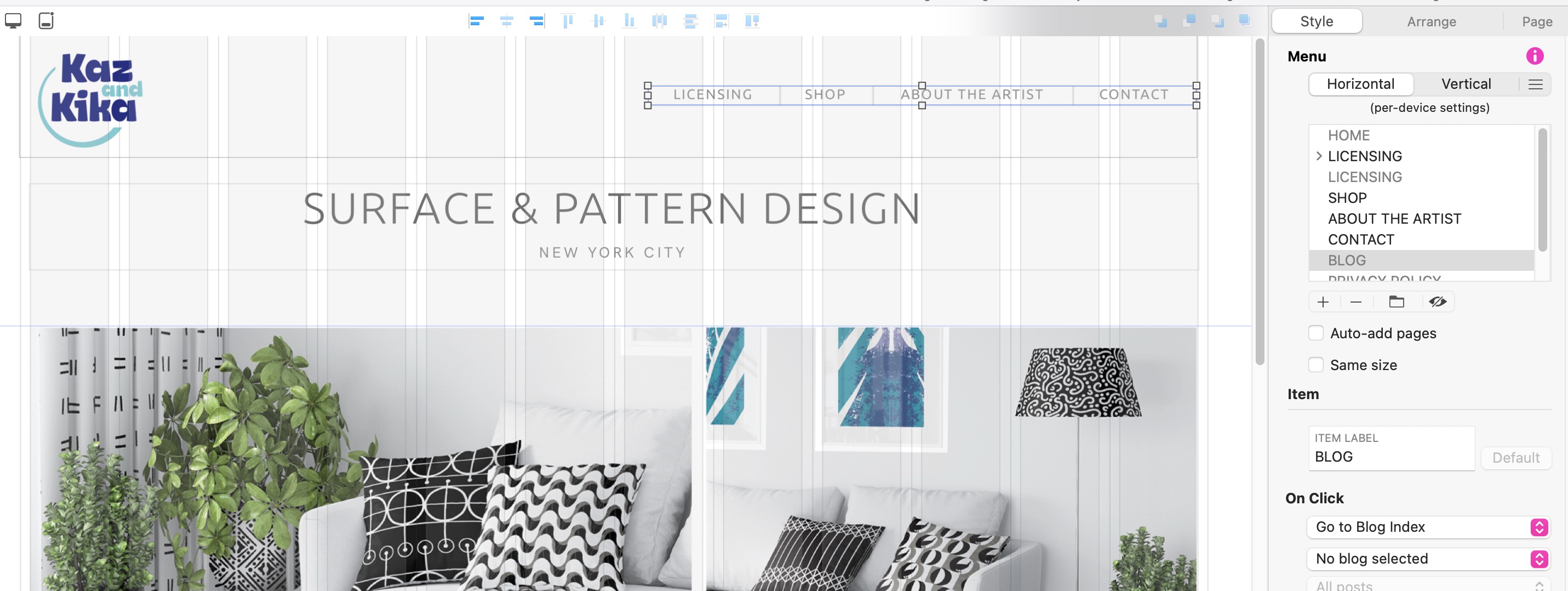
@Karenp, in your screenshot you have the “eye” icon turned off with your BLOG page selected. If you click on the eye icon does it have BLOG appear in the navigation bar?
Also your Sitely Menu is hard up against the edge of the web page. This might not allow BLOG to appear. Try moving it away from the edge and see what happens. If nothing try expanding it…
1 Like
Check bottom right “No blog selected”
You have a blog and a blog-index page? Or more than one blog?
Mr. F.
Continuing the discussion from Blog doesn't add to main menu:
Hello Karenp.
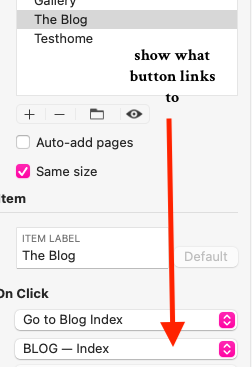
I may be misunderstanding but I did notice in your screenshot that you may have missed a step when creating the button. See attached
OMG you are so right @FlaminFig – when I moved the nav bar to the left it allowed me to select the eye icon and now BLOG shows in the nav bar. For some reason I assumed it would expand left ! Thank you so much for your help.
1 Like
@Mr_Fozzie - all good the fix was to move the nav bar to the left allowing for expansion room to the right. Thanks for jumping in to help.
@Mick Thanks for that - no doubt that was going to be my next issue!