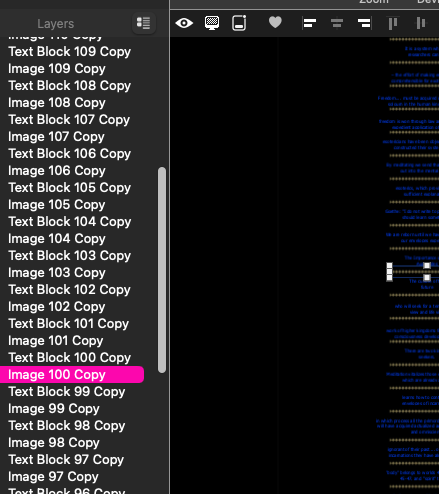
Hypothetical Strategy: I want to select all the text and block all images from selection of all text….
I want to select all the text, to change all text color on that single page, (and change text color identically)…This page was built years before and imported to Sitely. Any ideas for this? Thanks
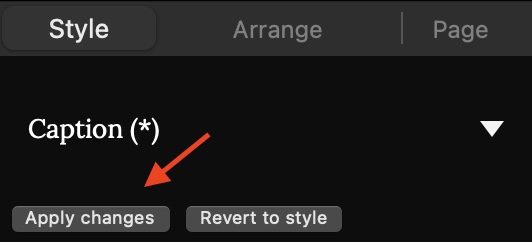
The simple option is to drag all your text box layers so they are all sitting one above the other. You can then select them all and change the text colour. Of course, if the layering is important (such as text blocks being placed on top of images) this won’t be the correct solution as your text boxes may end up behind the images. However, for future reference, this is one area where text styles come into their own. Create a text style specifically for your text blocks (presumably text captions for the images) Apply the style to each of the text blocks. When you want to change the text style/colour in the future, simply make the change to one of the text boxes and then click the Apply Changes button in the Styles section of the Style Panel (the text style name will show an asterisk to indicate that you’ve made a change to that style). Applying changes will change all instance of that style across the whole site.
Yes drag-selection was tried and wanted, but images interspaced between text-boxes all vary in widths so neither could be differentiated, as by vertical dragging.
It is still not clear if Sitely prefers each paragraph and each image in its very own block. (?)
My pictured Sitely page was coded with two or three different apps years past, and never by proper following of all manuals. (I work with dozens of different things, disciplines, softwares and physical project especially, with thousands of tools).
It is helpful to know about Sitely’s work flows, thanks very much for your reply.
I’ll just say it is a very good idea to think out the layout of your website…
If you do it or you don’t you’ll see naturally your content will form in blocks or sections. So a website page is made up of sections, and these in Sitely are defined as a Layout Block.
Within the Layout Block you would have content that becomes group(ed), like a Text Box and an Image. So yes if the image and the text is related they should be grouped.
A Tip: It is also a good idea to name your Layers.
Thanks so much for helpful replies and patients with details. I welcome insights and further elaborate in case other newcomers find it useful.
A self-blocking feature is very interesting to learn about. My first importation of a long, old-code page did just that, and at first sight this discouraged hope for quick content editing, because the blocks were not automatically connected and therefore not synchronized, as most word-processors will allow insertion or deletion of content mid-page, and then automatically position sentences, paragraphs, etc…
I was busy with other work all summer and got back to Sitely just recently. For the past few weeks, page editing of “Import Site” from Menu was used to import single pages from disk.
These came into Sitely without added blocks, and some blocks have been added to see if that helps. Composing thoughts outside of coding is my focus and app-switching back and forth is not a problem.
I’ve only tried quick tests of Publishing on disk, and little or no effect was observed, with or without blocks, so in the image I posted above the speed of getting it done was very gratifying. The color adjustment is not critical at this point, but indeed working up new content from scratch begs for some tips as you both kindly supplied.
I love the features and price point of Sitely and the ability to copy paste anything from browser or word processors for expedient word processing, and then back to Sitely for www features, phone displays, etc, etc…
Welcome to the community - I’m sure you will find plenty of help here - the people here are super helpful, so make this your first port of call if you need further information about using Sitely. You may also want to download the free guide to using Sitely - It contains a lot of information about some of the newer features that you may be unaware of. The link to the download is:
Have fun and feel free to ask any questions you may have.
Why would publishing on disk cut a webpage short, and display just the first quarter of the content?
Is it normally expected due to the warnings given when publishing to disk?
Can one download a final site-copy from their server after uploads, to archive their site which does display read-only mode offline?
I looked through The FREEDOM to DESIGN manual and am encouraged about Siteley potentials. Thanks, it’s like a gift ! However it says nothing related to debugging.
Are you meaning by what you posted that you are viewing the publish to disk on your Mac? If that is the case you will never get what exactly you will see on the hosting server,
I’ve never had a problem with viewing a site published to disk. In fact I always publish to disk before uploading to my server. If you want to download the site from your server, it’s best to zip all the files and folders on your domain and download the zip file. This can then be decompressed on your local computer for viewing.