I have a popup that I want to reveal as if it’s sliding down from behind something. Unfortunately, the “reveal” effect only gives me a left to right or right to left option. Is there any way to reveal it from top to bottom?
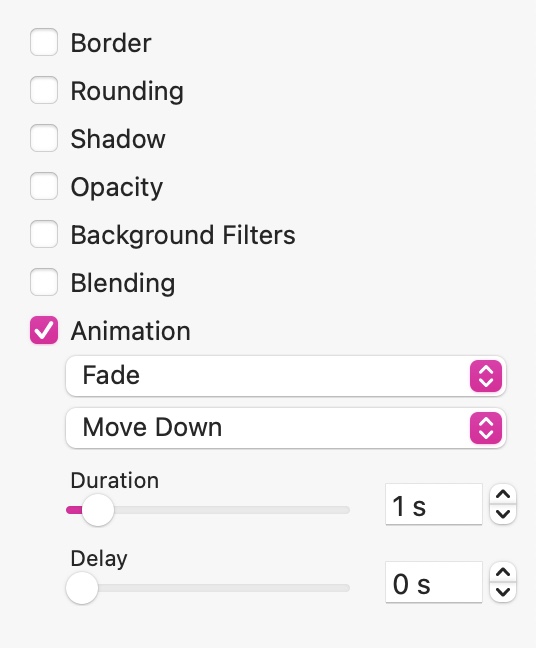
Unfortunately, that just causes the entire popup to fade into existence at the same time. I want it to expand like the reveal effect does. That way it appears to be sliding out from behind something.
The slide animation effect is the only one that doesn’t provide an “in-place” animation, which is what you’re wanting to achieve. The slide animations all work from the edge of the browser window. You could consider the alternative which would be to use the visibility option on a layout block. Essentially, create your pop-up content in a layout block and add a trigger (typically a button) that makes the layout block visible when clicked. This will allow you to add an animation effect (fade is recommended). When the trigger is activated, the layout block will slide into view with a slight fading effect. Here are the settings for the trigger button:
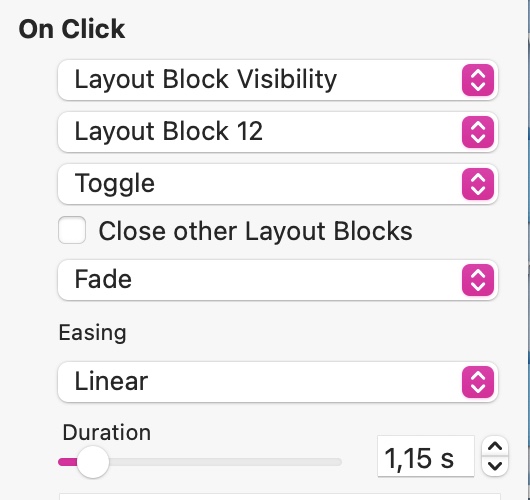
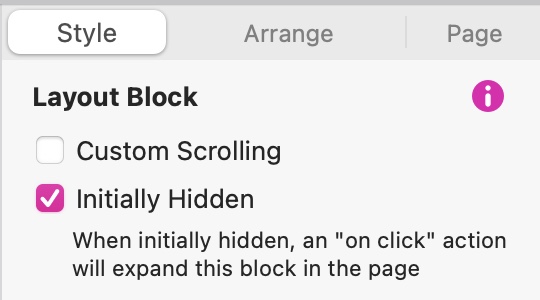
Of course, to make this work effectively, your layout block should be initially hidden and your trigger button should be set to “Toggle” so that clicking it again will hide the layout block. :
If custom CSS is available on your setup, one option is to animate the popup wrapper with clip-path from inset(0 0 100% 0) to inset(0 0 0 0), keeping transform-origin at the top. That masks the content and uncovers it downward in place, which is closer to the reveal effect than a fade or window-edge slide. A max-height animation with overflow hidden is a fallback, though it may be less smooth.