Using the image gallery, works fine for single images. I would like to use it elsewhere but I need to have it show multiple images across the page, sliding one image off, next image on, after every pause. Fpr example, at any time there might be 3 images on-screen, with just the far left image sliding off as one new image slides on from the right. The centre two just move over one spot until its their turn to slide off, etc. So not just showing one image at a time.
Any way to do that? I don’t see a setting, and the how-to page didn’t mention this.
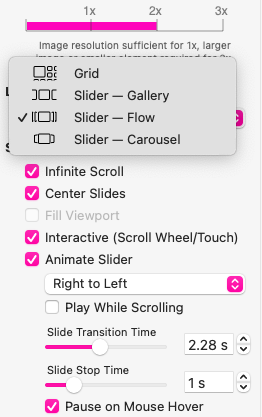
Hello Will. Your original post referenced the Image Gallery. I believe what you actually want to use is the Image/Video Grid which allows various options for scrolling images. Screen shot attached.
Rotate through the gallery … display the first 3 images, then slide over so 1 goes off the left side and a new one slides on from the right. So there are always 3 images but they rotate through the entire gallery then start at the beginning again. Like a carousel, goes round and round.
The Grid will show 3 images but doesn’t seem to automatically slide the images along, you have to manually swipe them along. Is there a setting to make it slide the images along automatically?
Thanks for the info Mick, those options only seem to change the design of the carousel, they don’t make it move. The Grid does allow me to show 3 images at a time but it doesn’t seem to have any carousel functions - I’m hoping i’ve missed something.
Never mind - I found the issue - there’s a toggle “play while scrolling” which has to be off for the carousel to move. I read that to mean only that the carousel would continue if someone was scrolling.