Sitely 6.0.3 gave me the option of creating a cookie banner to be compliant with the rules.
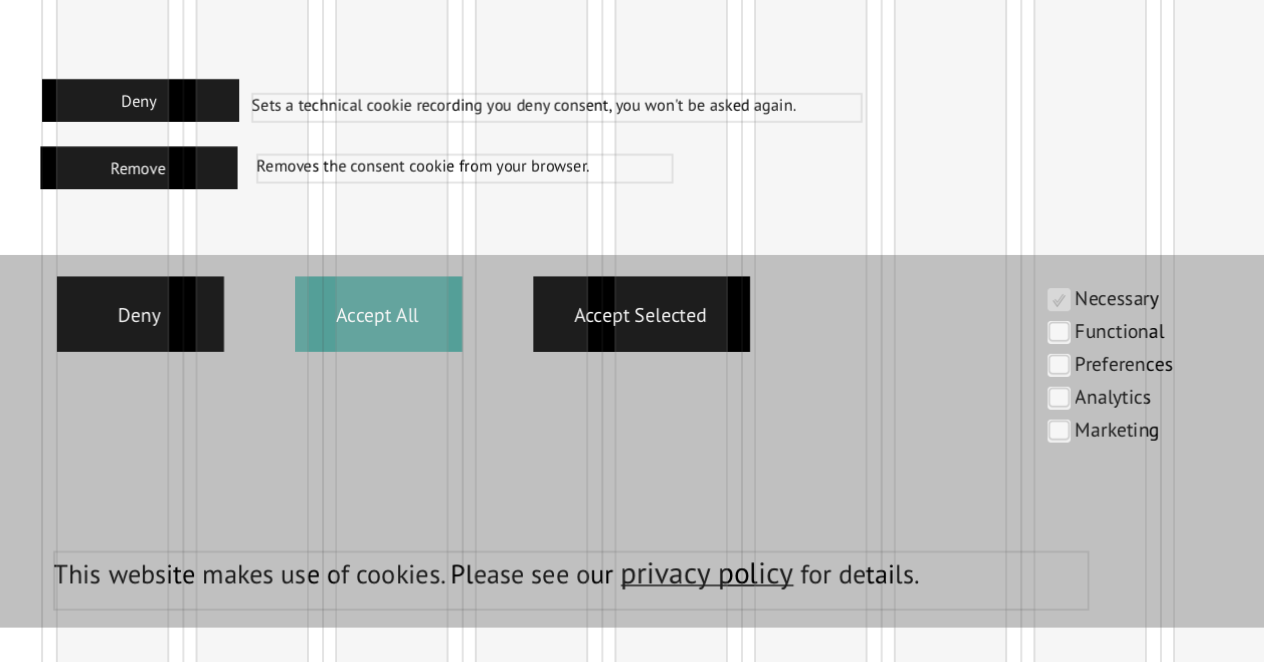
The result were Deny, Accept All, Accept Selected buttons and a half dozen checkboxes which are part of the grey background box.
But I also had Deny and Remove buttons above the grey background box accompanied by some text explaining what these Deny and Remove buttons do.
When I deleted these buttons and their text I saw a notice in the righthand panel telling me I was out of compliance so I clicked on that and it recreated the same mess.
I did have a cookie banner for years, so maybe there is some conflict between the old and new one.
sorry this is a source of confusion. The subject matter isn’t super simple, but perhaps we aren’t doing the best job, certainly a reflection of our difficulty in grasping it as well.
This is the logic:
your website might have some third party content (youtube video, maps, etc)
such content needs to be blocked until the site visitor has expressed consent to be exposed to the cookies of those third parties
“cookie” in legalese is a loose term that means any tracking technology (technically it can be also browser local storage, “super cookies” gleaned from your browser setup, other ways to uniquely or semi uniquely identify the visitor)
the grey box is the cookie banner, it will be shown to first time visitors and a banner-specific cookie will be stored in the browser when the site visitor decides (accepts/denies)
notice that in the preview service the default option is to show the cookie banner every time, so that you can see how the third party content would be shown, but the preview popup lets you switch to never showing it
now the recent update introduces the cookie types (functional, preferences, analytics, marketing), the third party content can theoretically have any mix of those, and the site visitor can opt to any combination via the “accept selected” button, or use “accept all” or “deny” for an all or none cookie acceptance
now in the page behind the gray box the “deny” and “remove” buttons let the site visitor also affect their consent, so “deny” is like clicking “deny” on the cookie banner, it records the refusal to accept any cookie type
the “remove” button will delete the banner-specific cookie (mentioned earlier) which contains the recording of the consent, as if the site never had been visited, clearly this will force the website to show the cookie banner again because nothing is known about the visitor anymore
That does clarify things more. It is especially nice that one can click Deny to erase their cookies.
One more question. Before this I long ago placed something from Google so I could see the analytics for my site (and to let them track usage).
On my index page I have this:
“Google Analytics is a web analysis service provided by Google. Google utilizes the data collected to track and examine the use of this site, to prepare reports on its activities and share them with other Google services.
Google may use the data collected to contextualize and personalize the ads of its own advertising network. Find Google’s privacy policy here.”
And I seem to recall there was something in Settings about this, too…plus maybe some sort of code Google generated inserted somewhere, too. I am a bit vague about my memory of all that as it was years ago.
Is that a duplication of the privacy and cookies policy? Should I copy/paste that Google oriented text over to my Privacy page and then delete it from my index page?
Is there something else I should clean up? I don’t really use the Google analytics, but I worry about not appearing in Google searches if I don’t cooperate with them.
And yes, my site is a bit of a complex mess as I started it way back and went through a series of website building programs (GoLive, Freeway, etc) that closed and I had to adapt the site structure each time I moved in such a way as to not break links to files in subfolders.