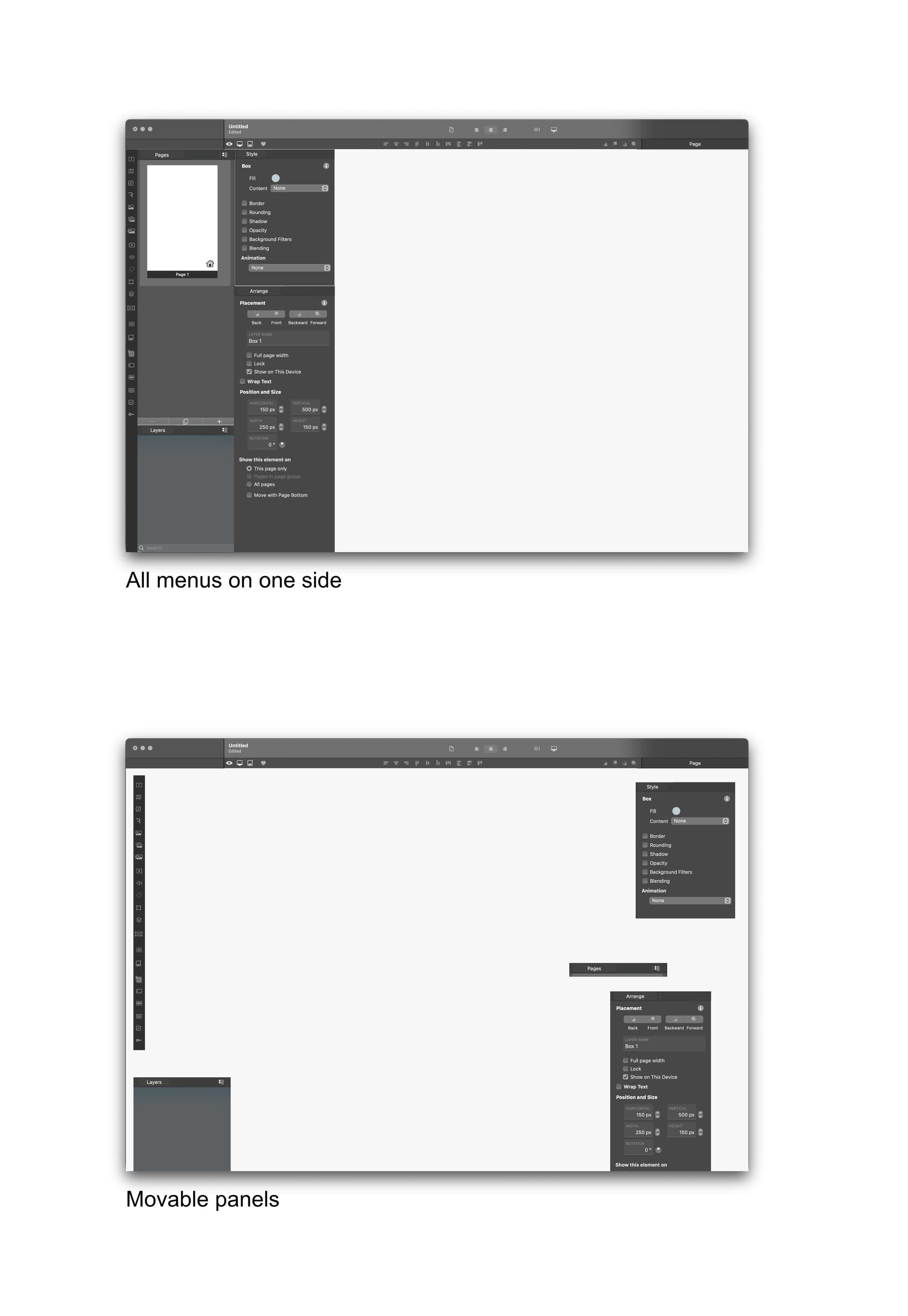
I just worked very extensively on a project where I needed to constantly change between the style and the arrangement tab. It is pain in the A ;). Every click that I can avoid would be helpful. Especially when moving around all the elements and being quick as a pro  with the mac, then constantly spending the extra second on switching is quite limiting in the speed. Maybe it is possible in the future to have this panels all be movable or detachable? No idea how it is coded, …
Also, I (and I knom, I am not alone in that), some of us are keeping all the tools at one side of the computer, so we don’t move the whole time from one edge of the screen to another. Maybe this arrangement of the palettes would be nice in the preferences, to f.e. have all the palettes on the left or right side of the screen.
Lastly, I understand the similarities of Sitely and Sketch and as a long time Sketch user, I appreciate it very very much. Nevertheless, one thing that I surely would appreciate as well, if the (+)ADD menu would be transformed to a Toolbar that is similar to all the other applicartions. Like that the customisable top bar stays cleaner and more focused, it could also get more contextual to show f.e. the colors or font size etc …
Just some ideas.
I have to admit, finally working with Sitely for the last one to two weeks so intensivly after owing it for some many years for a real project and seeing, how far that app came, was a pleasure. With some issues, but nevertheless, a great experience. I hope to see more updates and adjustments over the years to come.
Interesting, but for me I have no issues with how the UI is laid out… Maybe I am just use to it.
Everything to do with the pages and their structure is to my left, and everything with style and arrangement is to my right.
You could “(+)Add” across the very top of the Sitely UI, by hovering over that header area and right-clicking choosing the ones you want…
I guess if you are use to another system, like Sketch I can see why… but to be honest I found the Sketch UI just overwhelming and clumsy.
1 Like
Hi @FlaminFig and thank you for your pennies. But in all honesty, I do not get your response, and how it is helpful to convince me otherwise – I was talking simply about my experience. How is yours affecting mine or can help to change it? Also, you are contradicting yourself by admitting, you find Sketch overwhelming and clumsy. My suggestion is based on experience and measured time wasted on unnecessary clicks.—Obviously, I assume, you haven’t used Sketch since version approx 68. Even they introduced this solution (finally) where you have the main tools in reach of one click.—I recommend taking a look. They did a great job, especially in the latest fall update of 2025.
The context-sensitive UI like in Sparkle / Lunacy / Figma / Sketch / Blocs / Pen pot, and all the contextual panels like in f.e. our grandpa Quark Xpress, or the top control strip in Adobe and Affinity Suits works as long as the workflow is short, and your tasks are simple. If you need a lot of steps to go for complex issues / tasks, all of these apps introduced at some point (or from the beginning) consistency.
No, I wasn’t convincing you of anything, just my experience.
I don’t see how I was contradicting myself with Sketch. It is what I mentioned and so after 3 odd years I dropped it. But you are right I haven’t tried the latest.
Thx.
To clarify my observation, without bad feelings, you’re contradicting yourself by explaining your feelings about Sketch, which you find confusing, while not acknowledging how I feel about Sitely’s UX, even though we have different perspectives. Going in argumentative circles.
I really suggest you try Sketch—I am not in anyway connected to the company. Just my experience of being an on-off user for 13 years now.