Just when I thought I could take a break, I realised that my email form is working. I tried the mail-tester.com and no email is coming through there either.
Then I checked my other Sparkle sites and they’re not working - one of the sites is HERE. It was working previously but I’m not sure when that stopped as the emails are forwarded to the church administrators. It’s only when I did a test email last night and checked the cpanel mail box that I realised it is no longer working.
My host is Bluehost. I contacted them but they said that because my site isn’t Wordpress, they can only give me limited assistance. Very disappointing.
Any ideas on what I can do? Are there other Bluehosties out there with similar issues?
@jazzbird, From what I see you have it set up correctly, but I’ve noticed both your sites are running “http” which has become a big no no nowadays plus some hosting services are blocking emails without the mandatory security layer - SSL Certificate, aka “https”.
Hello again @FlaminFig. I had a check of my hosting account and apparently it is set up with the SSL Certs so I am very confused. I’ll contact the customer service again but they don’t seem very keen to help non-WP folks. I’m quite surprised! Thank you again!
@jazzbird, Ok if you have them assigned (the SSL Certificates) then they aren’t being forced which you can do in your cPanel by permanently redirecting (301) all http onto https…
Oh and it might be time to find another host if they are anti-everything except WordPress!
Hello! I am now fully https on all my three sites. But still no luck with email form via server. I find this odd as when I built my last site not all that long ago, the form worked a treat. Now suddenly none are working.
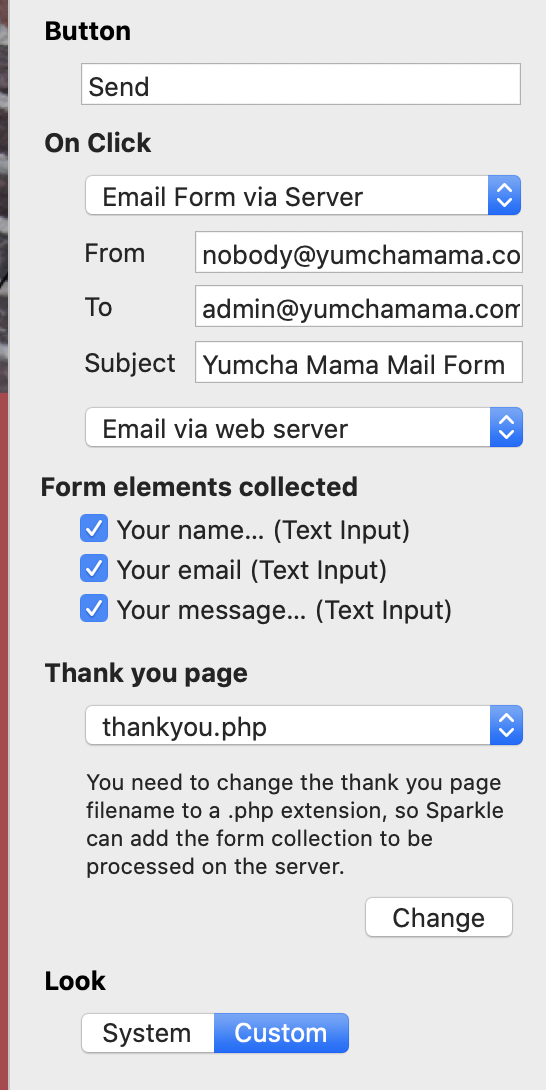
Hi @jazzbird, so you just need to click that “change” button. I guess the message is not clear, and you changed the page title to have a .php, which doesn’t actually do anything.
I am having this same issue using Email form via server. I also tried setting up custom smtp settings to a few different emails (gmail, yahoo, and outlook) and none worked as when I never received an email to none of my accounts. I have Sparkle 4.0.3 installed.
I agree with @Mr_Fozzie and please don’t take it wrong, we are happy to help everyone who provides enough informations, most of things in sparkle are working and we need to see what you’re doing different to see what is going wrong.
Thanks
Are your emails going through Outlook 365?
If it is then that is the issue you are having. Outlook is ridiculously security conscious and it needs to verify your email server.
The other thing is even emails nowadays need to be operating under an SSL Certificate and if you don’t have one then that can be another reason the Outlook 365 email servers are rejecting your email.
Greenskin is right, outlook 365 won’t work, tried and failed before. I am using a free google email email and misuse the smtp for sending emails. The other side won’t see that it comes from gmail because you give a name for the sender email.
I started with using my gmail and it didn’t work. I had first tried using the Email from server option and didn’t work so I tried again to use the custom smtp:


 . Seriously.


