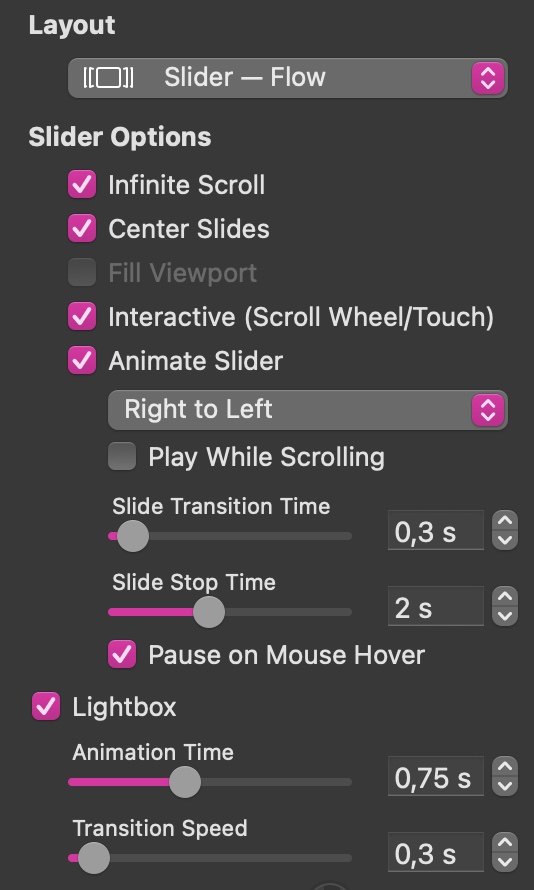
I had spent some time exploring Image Grid potential for my needs. I was especially interested in Slider Flow/Carousel layouts use. My only concern was about the 480 grid width. Too small since I design my pages only for 960 (and above) pixel displays and I like to present as big photos as possible. I had been trying several times to change the grid width, and to me it was possible, I set the width to 1000.
Here https://zbr.info.pl/Image_Grid are four examples of Slider Flow/Carousel layouts with different additional parameters.
However, there is one catch: I cannot reproduce a grid width change. I do not know how it happened. And it happened only once; I could only once change the width parameter in Image Grid, and the other three are the copies. What’s more, I can copy this 1000-width grid to other Sitely projects.
I like this XL grid size and it would be fine to have it as a regular feature.
Nice effect with the navigation. And I love the Slider Flow feature (I use a much smaller image for my use case). I wonder if there is an interest in having On Click, On Hover and Popups options with that? I don’t see that as available as is.
We may be thinking of different things. I was referring to Grid Layouts, specifically the flow carousel mode. I don’t see options to utilize On Click or On Hover actions with the Slider. Links to a webpage or Open Popup for instance. Maybe I am missing something.
It looks there are no options to use the actions you mention with the Slider except for the one which stops the Slider show (if set), namely: Pause on Mouse Hover (which I used in my examples). In fact I reckon it could be useful to have an On Click for a specific slide in which case the Slider could be used as a menu.
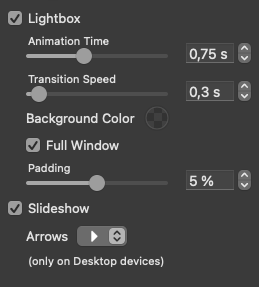
Although individual elements within a slider do not support on-click actions, you can enable the lightbox feature to enlarge images and scroll through them at full size. This option is available in the Style panel shown below.
There is one limitation to be aware of. If the slider is being used for mixed content - such as testimonials containing both text and images, as in the example below - the lightbox will not work. This is because the slider does not recognise the content as a single image, video or PDF page, so it has nothing to display in a lightbox.
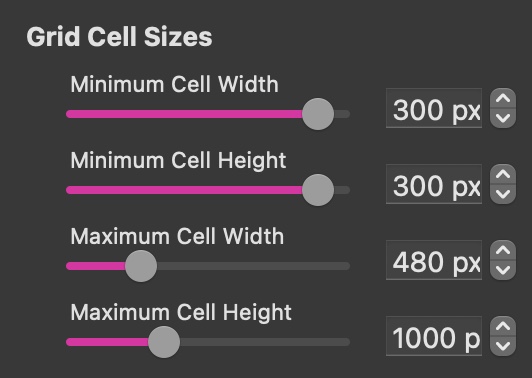
To return to the original question: before you can adjust the height and width of a cell in the image or video grid, you must first set the minimum and maximum grid-cell dimensions in the Arrange tab. By default, the minimum cell width and height are 300 px, while the maximum width is 480 px and the maximum height is 1,000 px. Once these values are changed, you can define different grid-cell sizes in the Style panel, as long as they fall within the minimum and maximum limits you have set.
What concerns a cell in the I/V Grid I expected the process of dimensions setting just as you described, but this is not the case. I checked it once more and to show how it looks like I made a video. I placed it on my original demonstration Image_Grid page.It can be opened with a button on the far right.
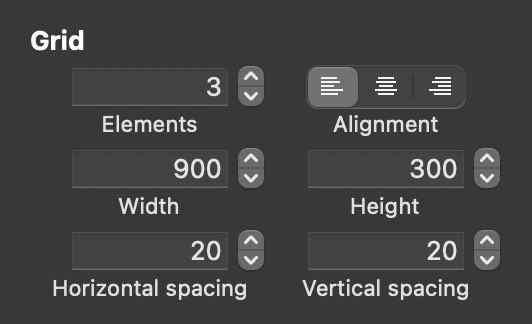
Ah, I see the problem. You are setting up the grid parameters correctly - allowing a maximum cell width of 1480. But, you are setting the actual grid size on the wrong panel - you need to do that in the style panel. Select the image video grid and scroll down the style panel until you see the section titled “Grid”. There you will see the option to set a grid height and width. It looks like this:
As you can see, I set this to be 900 (as shown in your example). This sets the grid size for all the individual cells within the grid. If you want to have different cell sizes within the same grid, you will have to take a slightly different route that I can walk you through if you need. Please have in mind that slider cells need to be a consistent size, but if you are using the grid option, you can have various sizes based on the number of columns or rows each grid cell occupies.