Tried for hours to get the contact form work. The form does not send. The thanks pop up does not open. Any suggestions. Is there a tutorial available. Thanks for reply.
Have you come across this @dory.glanzkohle.0c?
Hi Dory,
I feel your pain and have futzed around with these forms a lot.
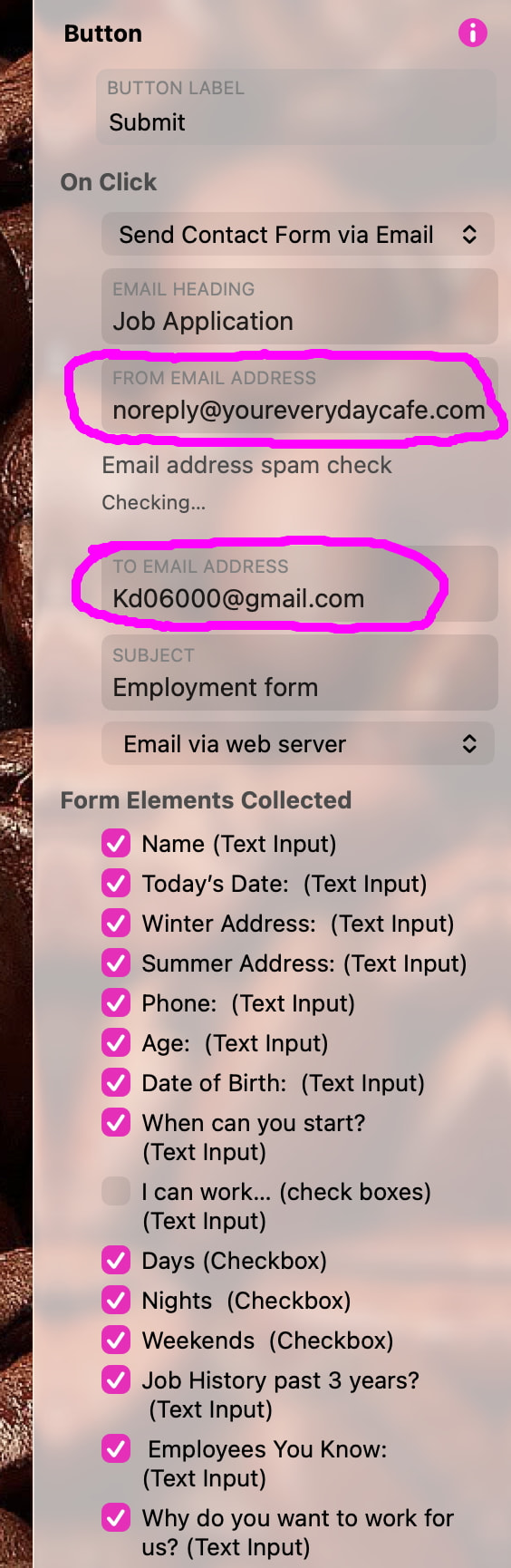
Here’s what I found to be important to make them work. Look at the 2 circled items in screenshot.
- FROM EMAIL ADDRESS. You need to make this as shown: NoReply@YourClientDomain
- TO EMAIL ADDRESS: Enter the email to which the form elements will get sent.
ALSO…..be sure to check:
• the boxes of FORM ELEMENTS COLLECTED. NOTE: You won’t see these until / unless you click on your SUBMIT button under the form. The whole list I have screenshotted appeared then.
• the drop down menu option under ON CLICK (near the top) select SEND CONTACT FORM VIA EMAIL.
–Dave
Hello Dave,
Thanks a lot for your help. At the end I succeeded. There was also a problem with my provider. Did cost me nearly a day of work. Let’s say, it’s not easy. Again Thank you again.
Thomas
Hello FlaminFig
I learned a lot about forms the last days.
I tutorial only on this argument would have helped.
Thanks Dory
1 Like