Hi, I need to make a 2nd language version of the site. Please give me some tips! Thanks,
YW
Hi, I need to make a 2nd language version of the site. Please give me some tips! Thanks,
YW
Hello @YaWb,
Here are some of the simplest solutions:
Duplicate each of your pages within the same project, and translate each of them.
Duplicate the entire project and work on two projects at the same time. (You could, for example, host one site in a /en/ folder and another in a /de/ folder).
Integrate the Google Translate tool into your site to automatically translate your pages at the visitor’s request.
If you don’t want to duplicate pages, i did a little tutorial here : Multi-language system (how to, step-by-step)
Recommendation:
1- build your website in one language in all aspects of design, responsiveness and placement.
2- install the required files (works only on live server  )
)
3- put all variables in your text on sitely
4- translate your text file in all languages you need
Exemple of a site i did in french / english : https://radinosilicani.com
Thank you very much for sharing @kanjo, it must have taken a lot of work !
Unfortunately, I think it is a bit too complex to set up for the majority of community members, and it also requires purchasing development tools.
I didn’t want to talk too much about code (we try to avoid that here), but here is a simpler alternative that is easy to use, requires no extra tools, and only needs a Sitely project.
This script fits in a single embed and allows you to:
automatically change the language based on the URL (e.g., /en or /fr),
update the page <title> and <meta description> (very important for search engines),
display translated texts directly in the Sitely preview.
Simply modify the code below to add all the languages and translations you need.
You will need to add as many lines as necessary for each language, in this format: Key: `Text associated with this key`,
Important: it is very important to respect this format, put the translated text between `` and end with a comma.
<script>


// ------------------------
// Configuration and translations
// ------------------------


// Preview language in Sitely (and online if the URL does not specify a language.)
const defaultLang = "en";


// Add or edit your languages and texts here.
const translations = {
  en: {
    title: `My Demo Website`,
    description: `Explore our demo website in multiple languages, easy to customize and tailored to your needs.`,
    welcome: `Welcome to our website!`,
    subtitle: `A subtitle to introduce your content`,
    content: `Welcome to our demo website. Here you can see how a simple multilingual system
    works in JavaScript, fully integrated into Sitely. This website automatically
    changes the language based on the URL (/fr or /en) and allows using calculators
    to display translated texts on all your pages.`,
    button: `Contact us`
  },
  fr: {
    title: `Mon site de démonstration`,
    description: `Découvrez notre site de démonstration en plusieurs langues, facile à personnaliser et adapté à vos besoins.`,
    welcome: `Bienvenue sur notre site !`,
    subtitle: `Un sous-titre pour introduire votre contenu`,
    content: `Bienvenue sur notre site de démonstration. Ici, vous pouvez voir comment fonctionne
    un système multilingue simple en JavaScript, directement intégré dans Sitely.
    Ce site permet de changer automatiquement la langue en fonction de l'URL (/fr ou /en)
    et d'utiliser les calculateurs pour afficher des textes traduits sur toutes vos pages.`,
    button: `Contactez-nous`
  }
};


// ------------------------
// End of translations, do not touch the code below.
// ------------------------


const supportedLangs = Object.keys(translations);
const pathParts = window.location.pathname.split('/');
const langFromURL = pathParts[1]; // Result: "fr"
const currentLang = supportedLangs.includes(langFromURL) ? langFromURL : defaultLang;
const untranslatedKeyMessage = "Translation not found";


function translate(key) {
  return translations[currentLang]?.[key] ?? untranslatedKeyMessage;
}

document.addEventListener("DOMContentLoaded", () => {
  document.title = translate("title");

  const metaDescription = document.querySelector('meta[name="description"]');
  if (metaDescription) {
    metaDescription.setAttribute("content", translate("description"));
  }
});
</script>
1. In Sitely, place an empty text area and format it as you like (colors, size, font, etc.).
2. Add a smart field “calculator” and paste this code inside:
return translate("content");
The text corresponding to the key in your main script will appear there. Replace “content” with the key for the text you want.
Depending on the URL, the text will display the English version (/en) or the French version (/fr).
3. At the bottom of the smart field settings, change the Expression Result Type from “Integer” to “String”
4. Finally, when your site is ready, host it in two separate folders/files, for example one named “en” and the other “fr”.
Here is the script in action. I hope this can help someone.
Translate with Javascript.sitely (116 KB)
All these solutions seems very complicated to me. Anything easier?
No, not at the moment.
Wow, that response after Allan tried to… I am just amazed about the rudeness of some people.
You know what, create your website in your language, copy the text in the original website it and use Google translate and then copy-paste I the new language website.
You know Google right? Do you know how to do copy paste? [Command+C] and [Command+ V]?
Or do you need something easier dear?
To translate your texts, there is a tool that is slightly better than Google Translate. I use Deepl, which is free, or paid for those who have a lot of text. DeepL Traduction – DeepL Translate : le meilleur traducteur au monde
I did many of those sites and the same way as Allan suggested (with en, de, fr and so on). See here one example: https://zaostrog-anita.com/
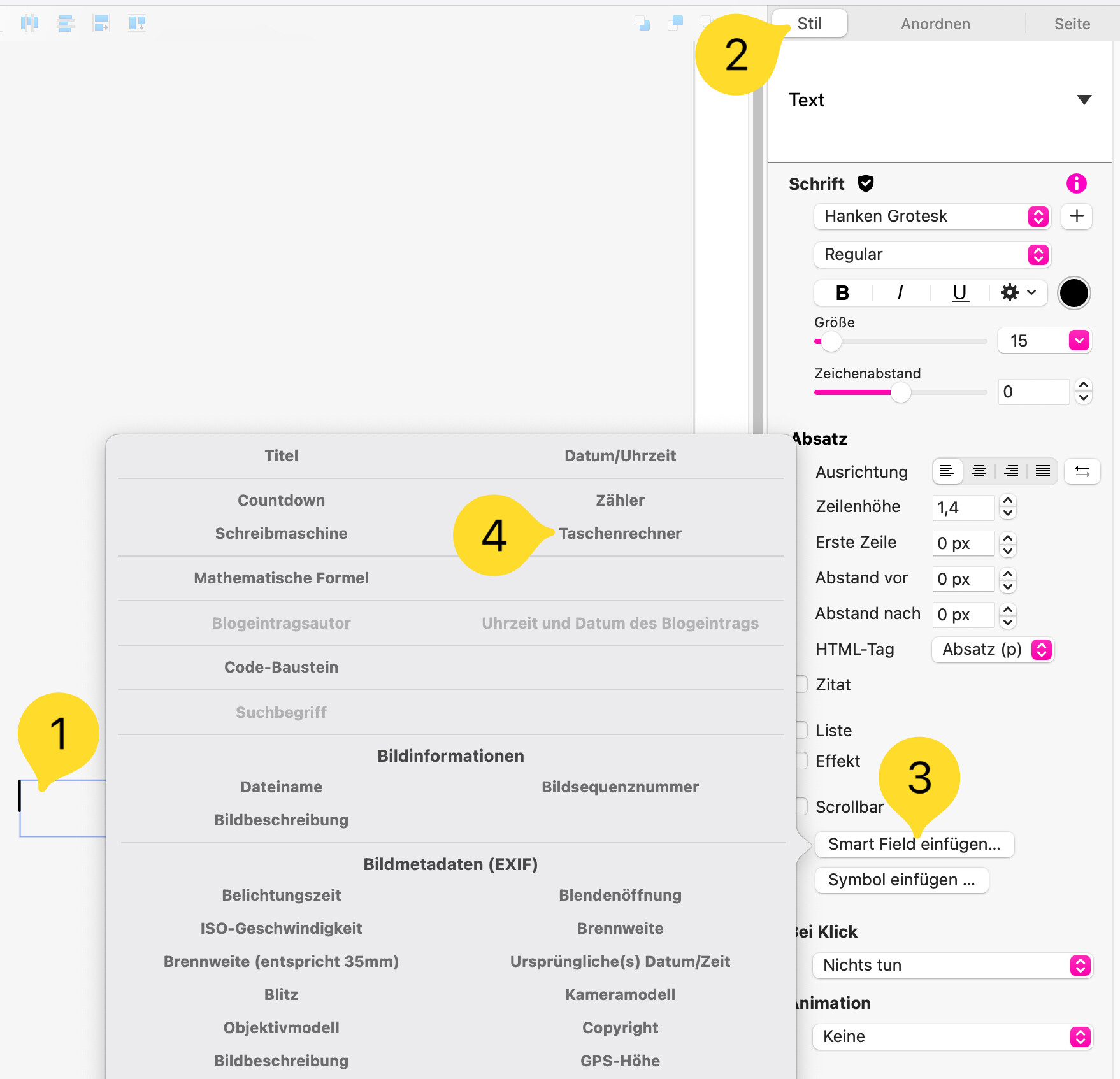
Thanks a lot Allan, but probably I am not up to par to understand it. I had a look at your file «Translate with javascrict.sitely» and then I had a total mess in my mind. The only thing I understood is where to place the code you mentioned here. OK I work in german and then I had a complete confusion. In fact I have always the name «Taschenrechner» (which means calculator), but my question is where are those calculator buttons? You put the button and defined it as «change the language». You see I am totally lost, but if it is too much for your to explain, leave it…. Thanks anyhow!
Hi @geneprofi 
It’s normal that you still see “Calculator” in Sitely’s canvas — the final text only appears in the preview.
To add a calculator, you can find it here:
Unless I misunderstood your question, no, there isn’t a button to switch languages. To change the default language (which also changes the language displayed in the canvas), you need to edit a line in the code.
And on your website, you’ll need to host your site in a separate folder for each language (for example: /de, /en, etc.).
Feel free to send me a private message if I can help 
Hallo @geneprofi
Es ist ganz normal, dass du im Sitely-Canvas weiterhin „Rechner“ siehst – der endgültige Text erscheint erst in der Vorschau.
Um einen Rechner hinzuzufügen, siehe das Bild oben.
Falls ich deine Frage nicht richtig verstanden habe: Nein, es gibt keinen Button, um die Sprache zu wechseln.
Um die Standardsprache zu ändern (was auch die im Canvas angezeigte Sprache ändert), musst du eine Zeile im Code anpassen.
Auf deiner Website musst du dann jede Sprache in einem eigenen Ordner hosten (zum Beispiel /de, /en usw.).
Schreib mir gerne eine private Nachricht, wenn ich dir helfen kann
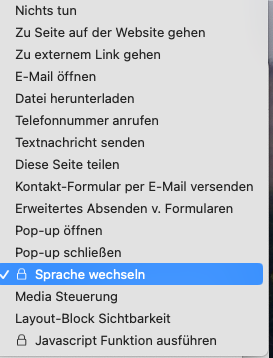
Thanks a lot for your reply. No in fact I saw this new function (probably in Sitely 6.0), with language-change (german version). after cklicking «on klick» See attach. Thanks once again for your explanation
i added the ability to change language with the url using htaccess, if you are interested i can update my post about that.
Example : Studio 1984 Laval – Studio créatif photo, vidéo, ateliers
please update how to do it, thanks
i will when i got back from vacations 
Automatic language redirects are fairly easy to do without necessarily tinkering with sever-side files like htaccess. Most of the multi-lingual sites I create use a JavaScript file that gets uploaded to your domain. A small code snippet is then added to your main index page and the index pages of language-specific versions of your site.
The script seamlessly redirects to the language version of the site based on the users system language and remembers the choice for future visits. There is also an override option that allows users to switch back to another language if they want to. Using that option the locally stored language choice is overwritten for future visits.
The reason I prefer this option is because it fully respects GDPR choices as well as keeping analytics in tact across the site. It also minimises the risk of users getting trapped into redirect loops. The only structural requirement is that each language version of the site be in it’s own language-specific sub folder. The script can be made to work with language-specific pages rather than subfolders, but this will require some additional editing of the JavaScript.
If anyone wants a copy of the script, just let me know and I will post it here with full instructions for customising the code. If you’re not comfortable with coding, please feel free to send me a DM telling me what languages you want and I’ll happily send you a production-ready version of the script with easy to follow instructions on how to implement it.
Hi Stephie, I’m interested in your script for my website. Would you accept to send it me ?
Tell me what languages you intend adding to your site and which of those languages will be the default. I’ll then send you the code ready to paste into a Sitely embed element. Alternatively, use the code below and edit your language choices in the code before adding to your Sitely project - instruction are included in the code.
<!-- =========================================================
SITELY MULTI-LANGUAGE SYSTEM
English = root /
Spanish = /es/
French = /fr/
German = /de/
Italian = /it/
Place this SAME Embed object on every page.
========================================================= -->
<div id="sitely-language-selector"></div>
<script>
(function () {
"use strict";
/* =====================================================
LANGUAGE CONFIGURATION
===================================================== */
const LANGUAGES = {
en: {
name: "English",
folder: ""
},
es: {
name: "Español",
folder: "es"
},
fr: {
name: "Français",
folder: "fr"
},
de: {
name: "Deutsch",
folder: "de"
},
it: {
name: "Italiano",
folder: "it"
}
};
const DEFAULT_LANGUAGE = "en";
const STORAGE_LANGUAGE = "sitelyLanguage";
const STORAGE_CHOICE = "sitelyLanguageChoice";
/* =====================================================
GET LANGUAGE FROM CURRENT URL
===================================================== */
function getLanguageFromURL() {
const path =
window.location.pathname;
/*
* Root website = English
*/
if (
path === "/" ||
path === ""
) {
return "en";
}
/*
* Check language directories
*/
for (const code in LANGUAGES) {
if (code === "en") {
continue;
}
const folder =
"/" + LANGUAGES[code].folder;
if (
path === folder ||
path.startsWith(folder + "/")
) {
return code;
}
}
/*
* Any path which does not begin with
* a recognised language directory is
* treated as English.
*/
return "en";
}
/* =====================================================
IS THIS AN EXPLICIT LANGUAGE URL?
===================================================== */
function hasExplicitLanguageURL() {
const path =
window.location.pathname;
/*
* Root is NOT considered an explicit
* language URL because English is the
* default language.
*/
if (
path === "/" ||
path === ""
) {
return false;
}
/*
* Check for a language directory
*/
for (const code in LANGUAGES) {
if (code === "en") {
continue;
}
const folder =
"/" + LANGUAGES[code].folder;
if (
path === folder ||
path.startsWith(folder + "/")
) {
return true;
}
}
/*
* A normal page at the root is explicitly
* an English page.
*/
return true;
}
/* =====================================================
DETECT BROWSER / SYSTEM LANGUAGE
===================================================== */
function detectBrowserLanguage() {
const browserLanguages =
navigator.languages ||
[navigator.language || navigator.userLanguage];
for (
const browserLanguage
of browserLanguages
) {
if (!browserLanguage) {
continue;
}
/*
* Convert:
*
* en-US → en
* es-ES → es
* fr-FR → fr
*/
const languageCode =
browserLanguage
.toLowerCase()
.split("-")[0];
if (
Object.prototype.hasOwnProperty.call(
LANGUAGES,
languageCode
)
) {
return languageCode;
}
}
return DEFAULT_LANGUAGE;
}
/* =====================================================
GET THE CURRENT PAGE WITHOUT LANGUAGE DIRECTORY
===================================================== */
function getPagePath() {
let path =
window.location.pathname;
/*
* Remove recognised language directory
*/
for (const code in LANGUAGES) {
if (code === "en") {
continue;
}
const folder =
"/" + LANGUAGES[code].folder;
if (
path === folder ||
path.startsWith(folder + "/")
) {
path =
path.substring(
folder.length
);
break;
}
}
/*
* Make sure path begins with /
*/
if (
!path ||
path === ""
) {
path = "/";
}
if (
!path.startsWith("/")
) {
path = "/" + path;
}
return path;
}
/* =====================================================
BUILD URL FOR ANOTHER LANGUAGE
===================================================== */
function buildLanguageURL(language) {
if (
!Object.prototype.hasOwnProperty.call(
LANGUAGES,
language
)
) {
language = DEFAULT_LANGUAGE;
}
const pagePath =
getPagePath();
/*
* English uses the root.
*/
if (language === "en") {
return pagePath;
}
/*
* Other languages use their folder.
*/
return (
"/" +
LANGUAGES[language].folder +
(
pagePath === "/"
? "/"
: pagePath
)
);
}
/* =====================================================
SAFE REDIRECT
===================================================== */
function redirectToLanguage(language) {
const target =
buildLanguageURL(language);
const current =
window.location.pathname;
/*
* NEVER redirect to the same URL.
*/
if (current === target) {
return;
}
/*
* Additional loop protection.
*
* If the target is identical after
* normalising trailing slashes,
* don't redirect.
*/
const normalise =
function (url) {
if (
url.length > 1 &&
url.endsWith("/")
) {
return url.slice(0, -1);
}
return url;
};
if (
normalise(current) ===
normalise(target)
) {
return;
}
/*
* Replace rather than creating a new
* browser history entry.
*/
window.location.replace(target);
}
/* =====================================================
LANGUAGE INITIALISATION
===================================================== */
function initialiseLanguage() {
const currentLanguage =
getLanguageFromURL();
const savedLanguage =
localStorage.getItem(
STORAGE_LANGUAGE
);
const savedChoice =
localStorage.getItem(
STORAGE_CHOICE
);
/* =================================================
EXPLICIT URL ALWAYS WINS
================================================= */
if (
hasExplicitLanguageURL()
) {
/*
* Do absolutely nothing.
*
* If the visitor is deliberately
* visiting /es/, /fr/, /de/ etc.,
* that URL wins over any saved preference.
*
* This also prevents redirect loops.
*/
return;
}
/* =================================================
ROOT WEBSITE
================================================= */
/*
* We are now at the root:
*
* /
*
* Therefore automatic detection or a saved
* manual preference can be used.
*/
/* =================================================
SAVED MANUAL CHOICE
================================================= */
if (
savedChoice === "manual" &&
savedLanguage &&
Object.prototype.hasOwnProperty.call(
LANGUAGES,
savedLanguage
)
) {
if (
savedLanguage !== "en"
) {
redirectToLanguage(
savedLanguage
);
}
return;
}
/* =================================================
NO MANUAL CHOICE
================================================= */
const detectedLanguage =
detectBrowserLanguage();
/*
* Remember the automatically detected
* language, but mark it as automatic.
*/
localStorage.setItem(
STORAGE_LANGUAGE,
detectedLanguage
);
localStorage.setItem(
STORAGE_CHOICE,
"automatic"
);
/*
* English remains at the root.
*/
if (
detectedLanguage === "en"
) {
return;
}
/*
* Redirect to detected language.
*/
redirectToLanguage(
detectedLanguage
);
}
/* =====================================================
MANUAL LANGUAGE CHANGE
===================================================== */
function selectLanguage(language) {
if (
!Object.prototype.hasOwnProperty.call(
LANGUAGES,
language
)
) {
return;
}
/*
* Save manual choice.
*/
localStorage.setItem(
STORAGE_LANGUAGE,
language
);
localStorage.setItem(
STORAGE_CHOICE,
"manual"
);
/*
* Move to equivalent page in
* selected language.
*/
redirectToLanguage(
language
);
}
/* =====================================================
RESET TO AUTOMATIC BROWSER LANGUAGE
===================================================== */
function useBrowserLanguage() {
/*
* Remove manual preference.
*/
localStorage.removeItem(
STORAGE_LANGUAGE
);
localStorage.removeItem(
STORAGE_CHOICE
);
/*
* Detect browser language again.
*/
const detectedLanguage =
detectBrowserLanguage();
/*
* Save as automatic preference.
*/
localStorage.setItem(
STORAGE_LANGUAGE,
detectedLanguage
);
localStorage.setItem(
STORAGE_CHOICE,
"automatic"
);
/*
* Go to detected language.
*/
redirectToLanguage(
detectedLanguage
);
}
/* =====================================================
CREATE VISIBLE LANGUAGE SELECTOR
===================================================== */
function createLanguageSelector() {
const container =
document.getElementById(
"sitely-language-selector"
);
/*
* Stop if the Embed container
* cannot be found.
*/
if (!container) {
return;
}
/*
* Prevent duplicate selector.
*/
if (
container.dataset.initialised === "true"
) {
return;
}
container.dataset.initialised = "true";
/* =================================================
CREATE SELECT
================================================= */
const select =
document.createElement("select");
select.id =
"sitely-language-select";
/*
* Add accessible label.
*/
select.setAttribute(
"aria-label",
"Select language"
);
/* =================================================
ADD LANGUAGES
================================================= */
for (
const code in LANGUAGES
) {
const option =
document.createElement("option");
option.value =
code;
option.textContent =
LANGUAGES[code].name;
select.appendChild(option);
}
/* =================================================
SELECT CURRENT LANGUAGE
================================================= */
const currentLanguage =
getLanguageFromURL();
if (
LANGUAGES[currentLanguage]
) {
select.value =
currentLanguage;
}
/* =================================================
LANGUAGE CHANGE
================================================= */
select.addEventListener(
"change",
function () {
selectLanguage(
this.value
);
}
);
/* =================================================
BASIC STYLING
You can change these values to match
your Sitely website.
================================================= */
container.style.display =
"inline-block";
select.style.padding =
"6px 10px";
select.style.fontSize =
"14px";
select.style.cursor =
"pointer";
select.style.backgroundColor =
"#ffffff";
select.style.border =
"1px solid #cccccc";
select.style.borderRadius =
"4px";
/*
* Add selector to Embed container.
*/
container.appendChild(
select
);
}
/* =====================================================
START LANGUAGE SYSTEM
===================================================== */
initialiseLanguage();
/* =====================================================
CREATE SELECTOR
===================================================== */
if (
document.readyState === "loading"
) {
document.addEventListener(
"DOMContentLoaded",
createLanguageSelector
);
} else {
createLanguageSelector();
}
/* =====================================================
OPTIONAL GLOBAL FUNCTION
Can be used by a separate Sitely button:
onclick="useBrowserLanguage()"
===================================================== */
window.useBrowserLanguage =
useBrowserLanguage;
})();
</script>
How it works.
Paste the code into an embed element in your Sitely Project. reduce the size of the embed element so that it is only displaying the language selector. Place the embed element in the navigation area of your web page - usually after the site navigation menu - for example:
Logo | Home | About | Experiences | Contact | [ English ▼ ]
The script above assumes:
//es//fr//de//it/So, to make the system work, create your default language site FIRST. Then duplicate the site for every language you want to create. Edit each site variant to reflect the language choice. Publish each language variant site into separate sub-folders on your domain - using the language ISO code as the folder names. Your default language version will be published to the root of your domain as usual.
What the visitor sees
When a visitor first visits your URL, the script will check the visitor’s default system language and redirect the the visitor to the appropriate language version of the site. If the visitors system language isn’t one of your supported languages, the default home page will be displayed (English in our example). Site visitors can manually select a language which will override the detected language. In any event, the language choice - whether automatically detected or manually selected, will be remembered on subsequent site visits.
Hi Stephy,
thank you for your prompt answer, the default language is French, than English, Netherland, German and Spanish.
I can try to do adapt the script following your instructions, but if you have the time to do it, I will be sure to avoid mistakes.
Here is the modified code: It should work just fine, but you may notice a Not Found error showing in the embed code box. However, if you preview in a browser you should see the normal selector. I’m not sure why this happens, but I think it has something to do with the autodetect part of the script. When I try this modified script on my computer, it attempts to switch to English automatically because my system language is English. However, because I haven’t actually created the language specific pages, the automatic redirect can’t work. So, it’s best to test it by publishing your complete site to your local disk - ensuring that language-specific versions are all in their relevant sub-folders. That way, you can test the whole thing on your local computer before uploading to your hosting server. What should happen is that your home page loads (in French). Selecting an alternative language will load that particular version AND REMEMBER that language choice for subsequent visits, or until you manually change to another language. For visitors who reach your site from say Spain, they will be directed to the Spanish Language version of the site
Let me know how it goes, If you get any issues, please feel free to let me know.
<!-- =========================================================
SITELY MULTI-LANGUAGE SYSTEM
French = root /
English = /en/
Dutch = /nl/
German = /de/
Spanish = /es/
Place this SAME Embed object on every page.
========================================================= -->
<div id="sitely-language-selector"></div>
<script>
(function () {
"use strict";
/* =====================================================
LANGUAGE CONFIGURATION
===================================================== */
const LANGUAGES = {
fr: {
name: "Français",
folder: ""
},
en: {
name: "English",
folder: "en"
},
nl: {
name: "Nederlands",
folder: "nl"
},
de: {
name: "Deutsch",
folder: "de"
},
es: {
name: "Español",
folder: "es"
}
};
const DEFAULT_LANGUAGE = "fr";
const STORAGE_LANGUAGE = "sitelyLanguage";
const STORAGE_CHOICE = "sitelyLanguageChoice";
/* =====================================================
GET LANGUAGE FROM CURRENT URL
===================================================== */
function getLanguageFromURL() {
const path =
window.location.pathname;
/*
* Root website = French
*/
if (
path === "/" ||
path === ""
) {
return "fr";
}
/*
* Check language directories
*/
for (const code in LANGUAGES) {
if (code === "fr") {
continue;
}
const folder =
"/" + LANGUAGES[code].folder;
if (
path === folder ||
path.startsWith(folder + "/")
) {
return code;
}
}
/*
* Any path which does not begin with
* a recognised language directory is
* treated as French.
*/
return "fr";
}
/* =====================================================
IS THIS AN EXPLICIT LANGUAGE URL?
===================================================== */
function hasExplicitLanguageURL() {
const path =
window.location.pathname;
/*
* Root is NOT considered an explicit
* language URL because French is the
* default language.
*/
if (
path === "/" ||
path === ""
) {
return false;
}
/*
* Check for a language directory
*/
for (const code in LANGUAGES) {
if (code === "fr") {
continue;
}
const folder =
"/" + LANGUAGES[code].folder;
if (
path === folder ||
path.startsWith(folder + "/")
) {
return true;
}
}
/*
* A normal page at the root is explicitly
* a French page.
*/
return true;
}
/* =====================================================
DETECT BROWSER / SYSTEM LANGUAGE
===================================================== */
function detectBrowserLanguage() {
const browserLanguages =
navigator.languages ||
[navigator.language || navigator.userLanguage];
for (
const browserLanguage
of browserLanguages
) {
if (!browserLanguage) {
continue;
}
/*
* Convert:
*
* en-US → en
* nl-NL → nl
* fr-FR → fr
*/
const languageCode =
browserLanguage
.toLowerCase()
.split("-")[0];
if (
Object.prototype.hasOwnProperty.call(
LANGUAGES,
languageCode
)
) {
return languageCode;
}
}
return DEFAULT_LANGUAGE;
}
/* =====================================================
GET THE CURRENT PAGE WITHOUT LANGUAGE DIRECTORY
===================================================== */
function getPagePath() {
let path =
window.location.pathname;
/*
* Remove recognised language directory
*/
for (const code in LANGUAGES) {
if (code === "fr") {
continue;
}
const folder =
"/" + LANGUAGES[code].folder;
if (
path === folder ||
path.startsWith(folder + "/")
) {
path =
path.substring(
folder.length
);
break;
}
}
/*
* Make sure path begins with /
*/
if (
!path ||
path === ""
) {
path = "/";
}
if (
!path.startsWith("/")
) {
path = "/" + path;
}
return path;
}
/* =====================================================
BUILD URL FOR ANOTHER LANGUAGE
===================================================== */
function buildLanguageURL(language) {
if (
!Object.prototype.hasOwnProperty.call(
LANGUAGES,
language
)
) {
language = DEFAULT_LANGUAGE;
}
const pagePath =
getPagePath();
/*
* French uses the root.
*/
if (language === "fr") {
return pagePath;
}
/*
* Other languages use their folder.
*/
return (
"/" +
LANGUAGES[language].folder +
(
pagePath === "/"
? "/"
: pagePath
)
);
}
/* =====================================================
SAFE REDIRECT
===================================================== */
function redirectToLanguage(language) {
const target =
buildLanguageURL(language);
const current =
window.location.pathname;
/*
* NEVER redirect to the same URL.
*/
if (current === target) {
return;
}
/*
* Additional loop protection.
*
* If the target is identical after
* normalising trailing slashes,
* don't redirect.
*/
const normalise =
function (url) {
if (
url.length > 1 &&
url.endsWith("/")
) {
return url.slice(0, -1);
}
return url;
};
if (
normalise(current) ===
normalise(target)
) {
return;
}
/*
* Replace rather than creating a new
* browser history entry.
*/
window.location.replace(target);
}
/* =====================================================
LANGUAGE INITIALISATION
===================================================== */
function initialiseLanguage() {
const currentLanguage =
getLanguageFromURL();
const savedLanguage =
localStorage.getItem(
STORAGE_LANGUAGE
);
const savedChoice =
localStorage.getItem(
STORAGE_CHOICE
);
/* =================================================
EXPLICIT LANGUAGE ALWAYS WINS
================================================= */
if (
hasExplicitLanguageURL()
) {
/*
* Do absolutely nothing.
*
* If the visitor is deliberately
* visiting /en/, /nl/, /de/ or /es/,
* that URL wins over any saved preference.
*
* This also prevents redirect loops.
*/
return;
}
/* =================================================
ROOT WEBSITE
================================================= */
/*
* We are now at the root:
*
* /
*
* Therefore automatic detection or a saved
* manual preference can be used.
*/
/* =================================================
SAVED MANUAL CHOICE
================================================= */
if (
savedChoice === "manual" &&
savedLanguage &&
Object.prototype.hasOwnProperty.call(
LANGUAGES,
savedLanguage
)
) {
if (
savedLanguage !== "fr"
) {
redirectToLanguage(
savedLanguage
);
}
return;
}
/* =================================================
NO MANUAL CHOICE
================================================= */
const detectedLanguage =
detectBrowserLanguage();
/*
* Remember the automatically detected
* language, but mark it as automatic.
*/
localStorage.setItem(
STORAGE_LANGUAGE,
detectedLanguage
);
localStorage.setItem(
STORAGE_CHOICE,
"automatic"
);
/*
* French remains at the root.
*/
if (
detectedLanguage === "fr"
) {
return;
}
/*
* Redirect to detected language.
*/
redirectToLanguage(
detectedLanguage
);
}
/* =====================================================
MANUAL LANGUAGE CHANGE
===================================================== */
function selectLanguage(language) {
if (
!Object.prototype.hasOwnProperty.call(
LANGUAGES,
language
)
) {
return;
}
/*
* Save manual choice.
*/
localStorage.setItem(
STORAGE_LANGUAGE,
language
);
localStorage.setItem(
STORAGE_CHOICE,
"manual"
);
/*
* Move to equivalent page in
* selected language.
*/
redirectToLanguage(
language
);
}
/* =====================================================
RESET TO AUTOMATIC BROWSER LANGUAGE
===================================================== */
function useBrowserLanguage() {
/*
* Remove manual preference.
*/
localStorage.removeItem(
STORAGE_LANGUAGE
);
localStorage.removeItem(
STORAGE_CHOICE
);
/*
* Detect browser language again.
*/
const detectedLanguage =
detectBrowserLanguage();
/*
* Save as automatic preference.
*/
localStorage.setItem(
STORAGE_LANGUAGE,
detectedLanguage
);
localStorage.setItem(
STORAGE_CHOICE,
"automatic"
);
/*
* Go to detected language.
*/
redirectToLanguage(
detectedLanguage
);
}
/* =====================================================
CREATE VISIBLE LANGUAGE SELECTOR
===================================================== */
function createLanguageSelector() {
const container =
document.getElementById(
"sitely-language-selector"
);
/*
* Stop if the Embed container
* cannot be found.
*/
if (!container) {
return;
}
/*
* Prevent duplicate selector.
*/
if (
container.dataset.initialised === "true"
) {
return;
}
container.dataset.initialised = "true";
/* =================================================
CREATE SELECT
================================================= */
const select =
document.createElement("select");
select.id =
"sitely-language-select";
/*
* Add accessible label.
*/
select.setAttribute(
"aria-label",
"Select language"
);
/* =================================================
ADD LANGUAGES
================================================= */
for (
const code in LANGUAGES
) {
const option =
document.createElement("option");
option.value =
code;
option.textContent =
LANGUAGES[code].name;
select.appendChild(option);
}
/* =================================================
SELECT CURRENT LANGUAGE
================================================= */
const currentLanguage =
getLanguageFromURL();
if (
LANGUAGES[currentLanguage]
) {
select.value =
currentLanguage;
}
/* =================================================
LANGUAGE CHANGE
================================================= */
select.addEventListener(
"change",
function () {
selectLanguage(
this.value
);
}
);
/* =================================================
BASIC STYLING
You can change these values to match
your Sitely website.
================================================= */
container.style.display =
"inline-block";
select.style.padding =
"6px 10px";
select.style.fontSize =
"14px";
select.style.cursor =
"pointer";
select.style.backgroundColor =
"#ffffff";
select.style.border =
"1px solid #cccccc";
select.style.borderRadius =
"4px";
/*
* Add selector to Embed container.
*/
container.appendChild(
select
);
}
/* =====================================================
START LANGUAGE SYSTEM
================================================= */
initialiseLanguage();
/* =====================================================
CREATE SELECTOR
===================================================== */
if (
document.readyState === "loading"
) {
document.addEventListener(
"DOMContentLoaded",
createLanguageSelector
);
} else {
createLanguageSelector();
}
/* =====================================================
OPTIONAL GLOBAL FUNCTION
Can be used by a separate Sitely button:
onclick="useBrowserLanguage()"
===================================================== */
window.useBrowserLanguage =
useBrowserLanguage;
})();
</script>