I have been running Sparkle 5 Pro for some time now, and when the Free update to version 6 came along I was eager to updated it. I then had to change a few things on our website , just text so nothing much, a simple task that I’ve done many times before.. When I had finished the website amendments and open the site online I was horrified to see that the front Index page was missing, the header was all fine but minus the rest of the front page information , now all in blue. The rest of the website pages are all working fine. I have tried to incorporate a new page but this doesn’t show up, everything else is working fine and Ive no where to turn for advice other than here. Is anyone else having the same issues with Version 6 and have they been able to find out why this has happening.
Hi @m0bjt 
Does the site display correctly in preview?
If yes, you can try the following:
- Clear your browser cache and refresh the page. If the problem persists, go to step 2.
- Try republishing the site from Sitely. If the problem is still there, go to step 3.
- Delete your site files, republish, and clear your cache again if necessary. Be careful not to delete any hosting files such as .htaccess or {to fill in}, for example.
This could also possibly be due to your server cache, but that’s less likely.
If not, or if the above steps don’t work, I recommend sending your project to Duncan at: feedback@sitely.app. If the file is too large to send by email, you can use swisstransfer.com to share it at the same address (feedback@sitely.app).
Hi Allan
I have been working for weeks trying to sort this issue out, but still cannot get to the bottom of the problem. I have tried all that you have suggested with no success. I have even downloaded the version 6 to another machine at a college of mine and he’s tried uploading the website and even this gives the same results. We are thinking that this maybe an issue with both Sparkle and the new version 26 apple iso that has just been released. I hoping that someone reading this may know more and can help solve this problem. Any more suggestions please get back in touch.
Cheers Kevin
In that case, the best option is to contact Duncan as I suggested. If you’re experiencing an issue with Sitely, there’s nothing better than reaching out directly to its creators.
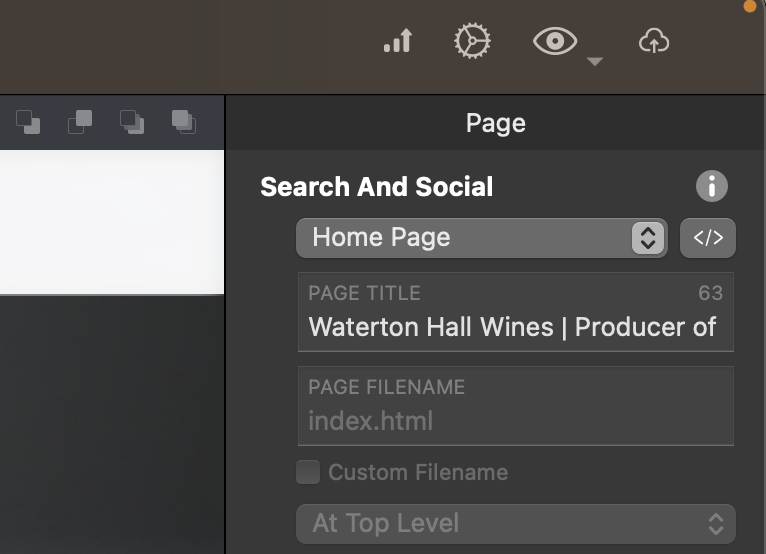
Is it possible @m0bjt that your home page isn’t defined as the “Home Page” and it isn’t anymore the “Top Level Page” and its file name isn’t “index.html”?
This is my setup for my home page, please see below…
The other thing is leaving us a link to your website to see what it is doing…